Posts

Final: How To Video

This final will assess your pre-production planning, production of the video, and post-production editing and exporting project into video file. 1. List of Instructions [Graded] - Choose a topic (something you can film during class, ask teacher if you are not sure if you can film it during class) - Describe what you need - In 5-10 steps, describe how to do it - Receive a Critique from a classmate: Write your name, their name, and the critique - Revise your instructions based on the critique you received (you may do this all on same piece of paper or separate papers) 2. Storyboard your How To Video [Graded] -Plan visually how this video will be filmed. (you may do this on paper in drawing, collage, etc. or on computer) 3. Film your video [Wednesday 12/6] 4. Edit your video [Friday, Monday 12/8, 12/11]     Export your video into video file (i.e. MOV file/QuickTime file)     Turn it in: https://www.dropbox.com/request/yUfxlohpxH6B7lvkcDeI 5...
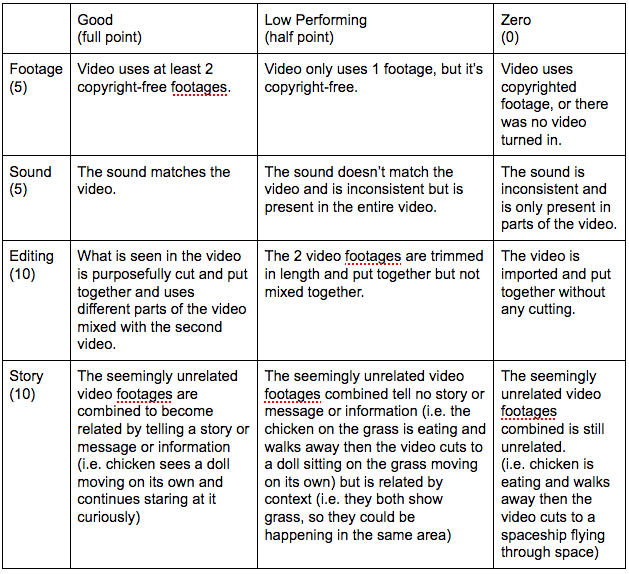
Editing Practice

Image
1. Find at least 2 seemingly unrelated video footage and download them. 2. Using Adobe Premiere, edit the two videos together in a way that makes them related and somehow present new information that the videos didn't have before by themselves. 3. Add different sound if the sound you have do not work together. 4. Export the edited file into a video format. 5. Turn in your video here: https://www.dropbox.com/request/VloR4sxRk01CyMwXi5z5 Rubric Basic Editing Tutorial Video:

How to videos and instructions

Image
Batch Renaming of files in Adobe Bridge:  Importing your image sequence to Adobe Premiere  1. Click on "File" Drop down menu on the top menu bar of the screen. 2. Select and click on "Import" 3. Go inside the folders that have your pictures and click on the FIRST/Beginning photo of your sequence. 4. Before you press "Import", Put a check mark on "Image Sequence" by clicking the box next to it. 5. Click "Import" 6. Click and drag the file it created over to the right along Video 1 Time Line. Adding Text/Title Adding Rolling Credit White Balancing and Color Correcting your entire footage in Premiere: Matching the Color of One of your images with the rest in Photoshop:    Adding Sound:

Stop Motion Rubric/Schedule

DIGITAL FILM PRODUCTION STOP MOTION - VISUAL ONLY - RUBRIC   EXCELLENT (10 pts) GOOD  (7 pts) NEAR PASSING  (5 pts) LOW PERFORMING  (3 pts) CREATIVITY (10) Utilizes the stop motion medium to its full advantage, creativity is exhibited all the way through, it could not have been just video recorded. Would watch it again. Some creative moments, mostly could have been video recorded. Got a bit old and boring. Very little thought and/or creativity; the whole thing could have been video recorded. Doesn’t contain any illusion of movement. PRODUCTION QUALITY (10) Good flow and transition. Subjects have illusion of life/magic. Visually interesting to watch. Some irregular and jumpiness, but flows well enough to tell what’s going on without getting too distracted. Irregular and jumpy all the way through. Have to play more than once to know what is going on. Some photos may be out of order. Video has some information but does not...

Photo Composition

Click on "READ MORE" to expand the post. Submit your photos using the link below: https://www.dropbox.com/request/VloR4sxRk01CyMwXi5z5 Under "Post a Comment" write: 1. Your First and Last Name. 2. What is your intended emphasis on your photo?  (ex. "I wanted to emphasize on my character that is being introduced who is new and lonely", "I wanted to emphasize the creepiness of the situation", "I wanted to emphasize how accomplished my character is feeling", etc.) 3. What purposeful, pre-planned things have you done to make that emphasis? (ex. "I created a shot where you can see my character's whole body that shows the tired posture and made the character small compared to the large school background. I placed the character in a corner to make the emphasis that the character doesn't belong, but made the objects and chairs and computers to line up so they lead your eyes to that character. I also have the character we...

Incredibles Composition Quiz Form

Please go to the below link to take your quiz: https://goo.gl/forms/R3AyGQ1h80hfCEiL2 If you finish early read this: http://floobynooby.blogspot.com/2013/12/the-cinematography-of-incredibles-part-1.html

Storyboarding

Intro to Storyboarding:  https://www.youtube.com/watch?v=RQsvhq28sOI Opening scene:  https://www.youtube.com/watch?v=CZhFtd1QZWc Spielberg character introduction:  https://www.youtube.com/watch?v=iQLJDxp2FEI Pixar in a box:  https://www.youtube.com/watch?time_continue=119&v=VMQIlb7t2v4